As you might already know, I’m a big fan of the Model-View-ViewModel pattern. I’m using it extensively on the current I’m working on at work. Today I had to face a simple problem that was tricky to solve.
In the application I’m building, I have a “Library panel”. This panel contains a set of items that are used in my application. Because the number of items can be very large, I decided to add a filter capability. Filtering to a collection is very straightforward once you get familiar with the ICollectionView interface. If you want more details about it, check out Marlon’s blog post about it.
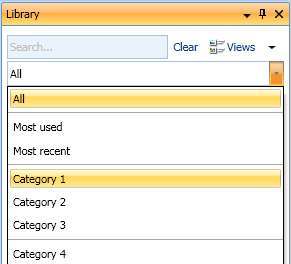
To give the user the possibility to filter the items, I added a ComboBox control. Of course, because I’m using the MVVM pattern, I’m not creating the ComboBoxItem myself, the databinding mechanism of WPF handle this (to be precise, the databinding handles collecting the item, and the ComboBox handles the creation of the ComboBoxItem to wrap them…).
The problem
In my ViewModel, I create a ObservableCollection<string> property that I called “Categories”.Then, in my view (XAML), I databound the ComboBox’s ItemsSource property to this “Categories”. Ok, it works fine and took me about 10min to do it.
Now, I want to add separator between some ComboBoxItem… Hmmm, how should I do that… I cannot do combobox.Items.Add(something) anymore because the ItemsSource property is databound… Well, I could as something in my ViewModel, but what ?
My solution
I wanted to keep the logical information about where Separator are in the ViewModel. This is typically an example of something that should stays in the ViewModel. I decided to add an empty items in my ObservableCollection for every Separator I wanter to have in the view.
In the view, I set up an ItemContainerStyle for my ComboBoxItem. The tricky part is, how could I replace my ComboBoxItem with a Separator… Well actually, we can’t. But what we can do is to change the entire template of the ComboBoxItem when the content is empty:
And voila ! It works fine and keeps the logic in the ViewModel. If you have any other idea about how we can solve this issue, please feel free to comment 🙂