
MVVM framework explorer updated !

.Net, Silverlight, Windows 8, Windows Phone, WPF 4 Comments »

After several requests, I finally took the time to update my MVVM Explorer Silverlight App !

Here is the changelog:

  • update all download stats (based ONLY on CodePlex stats)
  • refresh popularities
  • remove StructuredMVVM (not available on CodePlex)
  • add WinRT support (however, no toolkit seems to support if official yet)
Top 5 (most downloaded & supporting WPF, Silverlight and Windows Phone):
  1. MVVM Light (95k downloads)
  2. Caliburn Micro (27k downloads)
  3. nRoute (22k downloads)
  4. Simple MVVM toolkit (10k downloads)
  5. Catel (8k downloads)

As always, feedbacks are welcome !

BUILD: WinRT, Silverlight, WPF, XAML

Metro, Silverlight, Windows 8, WPF 4 Comments »

This blog post is part of my BUILD series.

I’m having a very busy week here in Anaheim ! I’m meeting many new people and had the chance to enjoy the conference from the inside. I’m also playing with this new Windows 8 slate Microsoft gave us ! I’m not going to do a blog post trying to summarize everything because there is just so much to say.I’m going to try to share my point of view on what I’ve seen here.

Our new platform

The original picture shown during the keynote to introduce the new platform was this one:
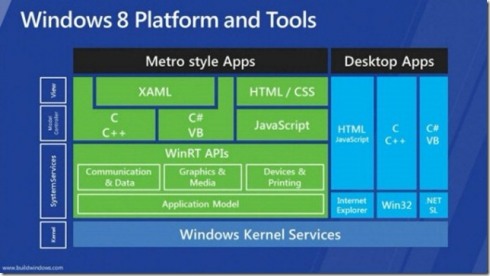
There has been a lot of confusion about that because of having XAML with C# in the Metro Style Apps without any reference to the CLR… Doug Steven did a pretty great job (blog post is here) by discussing with key people from the engineering team of Microsoft and creates this new more accurate picture:
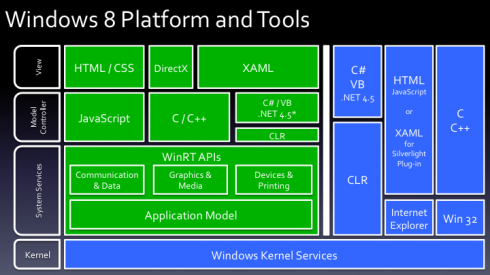
Here is a quick summary:

  • there is only one CLR
  • .Net framework 4.5 is used in both Metro apps and Classic apps
  • it’s the same MSIL for Metro apps and Classic apps
  • in the Metro platform, we have a subset of the .Net framework (for example no OpenFileDialog…)

New opportunities

Before //BUILD we had already many choices to choose our development environment. we now have even more:

  • WPF and managed code for classic desktop apps
  • Silverlight in a web environment
  • Silverlight out of browser
  • WinRT + XAML for Metro apps
  • WinRT + HTML for Metro apps

I personally think that Silverlight in a web browser has not a great future. Microsoft just announced for example that the immersive version of IE will not run any plugins (so no Silverlight in the Metro UI) and we ‘ll know Microsoft is pushing HTML5 very strongly.

For classic desktop apps we have 2 options: WPF and Silverlight. Each of them has advantages and the choice we’ll have to do will depend on our constraints (deployment, business needs, connectivity…). I think there is room for the 2 platforms there.

For the Metro UI, you can choose between XAML and HTML. Microsoft told us they will keep a good feature parity between the 2 options. If you choose XAML and managed code you’ll be able to leverage a subset of the .Net framework.

I think another important aspect is that Metro will be available on Windows 8 only. Even though this new version of the OS might have a fast deployment rate (thanks to the slates), in many companies I don’t think it will be that fast.This, plus the fact that some LOB apps will not benefit the Metro UI leaves a lot of work to do in the desktop applications world (where we have both WPF and SL)… For WPF, we now have a new version coming in .Net 4.5. You can check out the new stuff here in the documentation.

In my next blog post I’m going to try to go deeper in the new WinRT/XAML world and see how it looks like for us, WPF and Silverlight developers.

 

MVVM Framework explorer updated

Silverlight, Windows Phone, WPF 1 Comment »

I just updated my MVVM frameworks explorer Silverlight application. You can find the updated application here.

Here is the top 5 of MVVM frameworks supporting WPF, Silverlight and Windows Phone 7:

  1. MVVM Light (61k downloads)
  2. nRoute (19k downloads)
  3. Caliburn Micro (18k downloads)
  4. Simple MVVM toolkit (5k downloads)
  5. Catel (5k downloads)

When enough ViewModel is enough

Silverlight, Windows Phone, WPF 9 Comments »

In the last few years, we’ve seen the WPF and Silverlight community embracing the MVVM methodology. As one of the early adopters of MVVM (one of my first post about the subject was late 2008), I’ve seen the pattern evolving both in the web community and with developers I’ve met in my daily life.

Today, I’d like to share with you a simple concept I try to stick to when I’m doing WPF, Silverlight or Windows Phone 7 development. It can be summarized as “Enough ViewModel is enough”.

The simple idea behind this slogan is that there ARE stuff which are view-related and SHOULD NOT be embedded in the ViewModel layer. I’ve seen too many developers going the “100% viewmodel way” which means for them absolutely no code-behind without any dispensation.

For example, I came across this code. It’s the ViewModel layer associated to a simple view where the user fills various input and has immediate feedback about the progress (like “75% of the fields are completed”). If by the way you’re interested in implementing this behavior you can check out this article I wrote on CodeProject)

The following code is simplified to the sake of the article:

?View Code CSHARP
1
2
3
4
5
6
7
8
9
10
11
12
13
14
15
16
17
18
19
20
21
22
23
24
25
26
27
28
29
30
31
32
33
34
35
36
37
38
39
40
41
42
43
44
45
46
47
48
49
50
51
52
53
54
55
56
57
public class ViewModel
{
    // data field acts as the model object behind the VM layer
    private Data data;
 
    // missing code...
    // public properties used by the view using databinding
 
    public ViewModel()
    {
        // very simplified for this article...
        this.data = new Data();
        this.data.SelectedValuesChanged += new EventHandler(data_SelectedValuesChanged);
    }
 
    public void UpdateProgress()
    {
        // some code...
    }
 
    void data_SelectedValuesChanged(object sender, EventArgs e)
    {
        this.UpdateProgress();
        this.Initialize();
    }
 
    public void Initialize()
    {
        var item = this.data.GetItem("id1");
        if (item != null)
        {
            item.PropertyChanged += new PropertyChangedEventHandler(item_PropertyChanged);
            item.SelectedValuesChanged += new EventHandler(item_SelectedValuesChanged);
            foreach (var value in item.Values)
                value.PropertyChanged += new PropertyChangedEventHandler(item_PropertyChanged);
        }
 
        item = this.data.GetItem("id2");
        if (item != null)
        {
            item.PropertyChanged += new PropertyChangedEventHandler(item_PropertyChanged);
            item.SelectedValuesChanged += new EventHandler(item_SelectedValuesChanged);
            foreach (var value in item.Values)
                value.PropertyChanged += new PropertyChangedEventHandler(item_PropertyChanged);
        }
    }
 
    void item_PropertyChanged(object sender, System.ComponentModel.PropertyChangedEventArgs e)
    {
        this.UpdateProgress();
    }
 
    void item_SelectedValuesChanged(object sender, EventArgs e)
    {
        this.UpdateProgress();
    }
}

The idea is simple, as soon as the user changes a value in the View, we must compute the current progress. Because the ViewModel have several levels, we end-up having to register to every single PropertyChanged event which leads to cumbersome code. By the way, this code can also creates memory leaks since we register a lot of event handlers without removing them, but that’s another discussion…

Here is my way to solve this problem:

?View Code CSHARP
1
2
3
4
5
6
7
8
9
10
11
12
13
14
15
16
17
18
19
20
21
public partial class View : UserControl
{
    private readonly ViewModel viewmodel;
 
    public View()
    {
        InitializeComponent();
 
        this.viewmodel = new ViewModel();
 
        this.AddHandler(
            FocusManager.LostFocusEvent,
            new RoutedEventHandler(this.OnLostFocus),
            true);
    }
 
    private void OnLostFocus(object sender, RoutedEventArgs e)
    {
        this.viewmodel.UpdateProgress();
    }      
}

What is wrong with this way ? The View has code-behind ? That’s not a big deal: the code is more readable, maintainable. It makes also more sense: when a view-related operation occurs (in this case, focus has changed), update the progress.

The simple message I’d like to spread is the fact that there is nothing wrong with the fact to have sometime, a little bit of code-behind in your view if that facilitates your architecture. There is no need to create a complicated infrastructure with behaviors, commands or bindings just to keep the view empty if that does not make sense.

Another great example in a real application is available in the Advanced MVVM book by Josh Smith.


Mix11: Silverlight 5 beta

Silverlight 4 Comments »

This is the part 2 of my post about today’s Mix keynote – first one is about Windows Phone 7 improvements. Now let’s talk about Silverlight 5 !

New features:

  • Multiple Windows support (for Out Of Browser scenarios)
  • Ancestor RelativeSource binding
  • Implicit DataTemplates
  • ClickCount for mouse events
  • Binding on Style setter
  • Realtime sound (low-latency audio)
  • Variable speed playback
  • Linked text containers
  • Custom markup extensions
  • XAML binding debugging
  • 3D graphics API (based on XNA)

Other features

  • HW video decode for H.264
  • Multi-core background JIT
  • Improved graphic stacks
  • XAML parser performance improvements
  • Network latency optimizations
  • Text layout performance improvements

Download everything you need right now: http://www.silverlight.net/getstarted/silverlight-5-beta/

2010 roadmap

General No Comments »

I wish a happy new year to all my readers across the web. I thank you for all the feedback I got during the past year and I hope we will be able to exchange more in 2010. In this post, I’m sharing with you my roadmap for interesting events and dates in 2010:

  • January 7-10th: CES (Consumers Electronic Show) in Las Vegas
  • February 8th – 10th: Microsoft TechDays in Paris. I’ll be there  for the event and I’m hoping to be recruited by Microsoft for the ATE (Ask The Expert) stand where I’d like to share my WPF experience with other developers
  • March: release of Visual Studio 2010 and .Net 4.0 RC
  • March 15-17th: MIX10 in Las Vegas. We can expect more announcements about Silverlight4 and hopefully some information about the future of Silverlight on mobile and demos of Windows Mobile 7 as well
  • April: release of Visual Studio 2010 and .Net 4.0 final
  • Autumn : release of Windows Mobile 7

I think 2010 is going to be an exciting year with VS2010, .Net4, Silverlight4 and hopefully a mobile version of Silverlight too. Stay tuned :-)

WP Theme & Icons by N.Design Studio
Entries RSS Comments RSS Log in