Review of 2009 blog posts

General No Comments »

In the past year, I’ve posted more than 30 articles on my blog. Here is a summary of those posts (link in bold are those which got the most traffic during the year). Obviously, MVVM was a very hot topic during 2009 :-)

January

February

March

April

May

July

August

September

October

November

2010 roadmap

General No Comments »

I wish a happy new year to all my readers across the web. I thank you for all the feedback I got during the past year and I hope we will be able to exchange more in 2010. In this post, I’m sharing with you my roadmap for interesting events and dates in 2010:

  • January 7-10th: CES (Consumers Electronic Show) in Las Vegas
  • February 8th – 10th: Microsoft TechDays in Paris. I’ll be there  for the event and I’m hoping to be recruited by Microsoft for the ATE (Ask The Expert) stand where I’d like to share my WPF experience with other developers
  • March: release of Visual Studio 2010 and .Net 4.0 RC
  • March 15-17th: MIX10 in Las Vegas. We can expect more announcements about Silverlight4 and hopefully some information about the future of Silverlight on mobile and demos of Windows Mobile 7 as well
  • April: release of Visual Studio 2010 and .Net 4.0 final
  • Autumn : release of Windows Mobile 7

I think 2010 is going to be an exciting year with VS2010, .Net4, Silverlight4 and hopefully a mobile version of Silverlight too. Stay tuned :-)

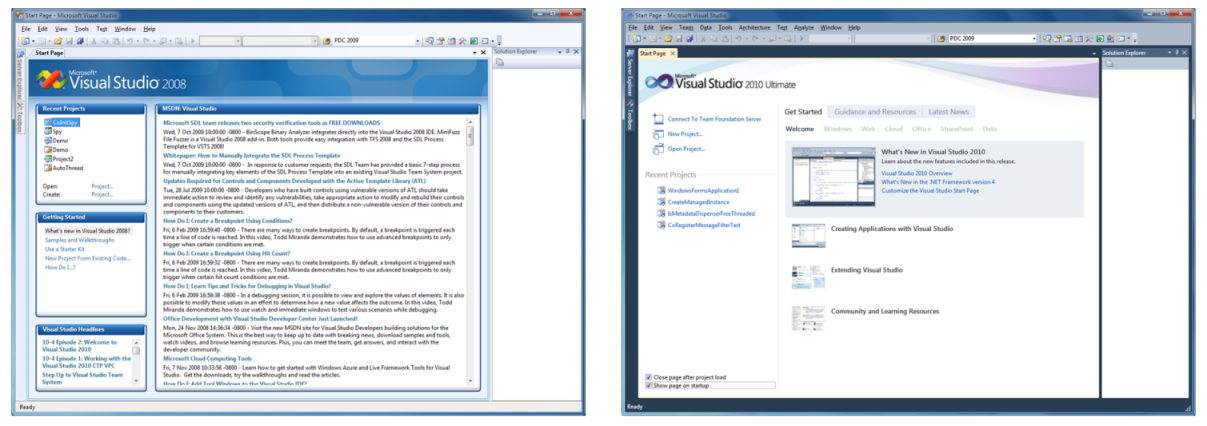
PDC09 : How VS2010 was built with WPF ?

.Net, Events, Tools, Visual Stutio, WPF No Comments »

PDC09

In my last blog post, I did a review of a PDC09 Session “Advanced performance tuning with WPF”. Today, I’m doing a review for another very interesting session “How VS2010 was built with WPF ?”. The video is available here.

vs2008tovs2010

Why did Microsoft choose WPF for VS2010 ?

  • Technological: prove the capabilities of WPF4
  • Architectural
    • Separated presentation
    • Support for long range road map (+10 years)
  • Key VS2010 features need it: Editor, Architecture Editor, Parallel tools debugging
  • Take an opportunity to give feedback for WPF4: when VS2010 development started, .Net 3.5 SP1 was just shipped and it was the right time to give feedback for the new features and fixes for WPF4.

It is worth noting that VS2010 is a project that is being watched carefully inside Microsoft. We can expect that more Microsoft applications will move to WPF in the next coming years.

What WPF features are used ?

  • Declarative UI using XAML
  • Databinding
  • Styles and templates
  • Application Resources
  • Interop Win32 (because they did not have the time to rewrite everything using WPF or because features doest not need to use WPF for example de WinForms designer…)
  • Integration with the message loop (to deal with particular focus issues)
  • New text stack (part of WPF4) based on DirectWrite

Staged approach

  • Define data models: a huge diagramming and architectural exercice
  • Replace the main window with WPF (only the window not its content !) to start the mix approach (managed/unmanaged, WPF/Hwnds)
  • Write new managed components: Window manager, command bar presentation
  • Scout with other VS teams
  • Test, Test, Test…

What were the challenges ?

  • Mixed mode application: native and managed code; WPF and HWNDs (Win32 or WinForms)
  • Keep existing extensions working and allow new extensions to take advantage of WPF
  • Don’t “stop the train” other teams were working at the same time on the product to add new functionalities
  • Text clarity
  • Performance
  • Focus management

You can watch the session here if you want more detail and demos of what I mention in this post.

Using Snoop to take a look at VS2010 !

.Net, Visual Stutio 5 Comments »

If like me you’re curious about how big WPF applications are made, you probably tried to use Snoop to inspect the visual tree of Visual Studio 2010 Beta2. And you probably had a problem because Snoop wasn’t able to detect the devenv process of VS2010:

I wasn’t sure about the cause of this problem, but I grab the source of Snoop and took a look at the code that list the available window:

?View Code CSHARP
1
2
3
4
5
6
7
8
9
10
11
12
public void Refresh() {
	this.windows.Clear();
 
	foreach (IntPtr windowHandle in NativeMethods.ToplevelWindows) {
		WindowInfo window = new WindowInfo(windowHandle, this);
		if (window.IsValidProcess && !this.HasProcess(window.OwningProcess))
			this.windows.Add(window);
	}
 
	if (this.windows.Count > 0)
		this.windowsView.MoveCurrentTo(this.windows[0]);
}

I setup a breakpoint to find out what was wrong and discover that the window.IsValidProcess failed with the VS2010 process. Because I just wanted to check if it was the only reason why Snoop wasn’t able to inspect it, I hack the code to remove this test:

?View Code CSHARP
1
2
3
4
5
6
7
8
9
10
11
12
public void Refresh() {
	this.windows.Clear();
 
	foreach (IntPtr windowHandle in NativeMethods.ToplevelWindows) {
		WindowInfo window = new WindowInfo(windowHandle, this);
		if (/*window.IsValidProcess &&*/ !this.HasProcess(window.OwningProcess))
			this.windows.Add(window);
	}
 
	if (this.windows.Count > 0)
		this.windowsView.MoveCurrentTo(this.windows[0]);
}

And it’s working:

vs2010-snoop

Happy exploration with Snoop :-)

Visual Studio 2010: Beta1 available with .Net4 and WPF4 included

Visual Stutio 2 Comments »

In case you missed it, Beta1 of Visual Studio 2010 has been announced yesterday.

vs2010

Since monday it is available to all MSDN subscribers, and will be avaible to the rest of the world on wednesday. Documentation has also been updated to show the new features of this release.

The download is on its way and I’ll try to post feedback as soon as I can, stay tuned !

VS2010 UI

Visual Stutio 1 Comment »

I’ve been very busy the last few weeks and I don’t have lot of time to write new articles…

Anyway, new informations are available about VS2010 UI (which will use WPF !), more details here: http://blogs.msdn.com/jasonz/archive/2009/02/20/a-new-look-for-visual-studio-2010.aspx

I can’t wait to play with a new beta :-)

Visual Studio 2010 CTP

Visual Stutio 1 Comment »

As you may already now, a CTP (Community Technology Preview) of the next version of Visual Studio is available to download. I took some time yesterday evening to try it and here is the result of my first hour using Visual Studio 2010.

Read the rest of this entry »

Historical debugger in Visual Studio 10

General 1 Comment »

As you may already know, last week, Microsoft reveals the next version of Visual Studio : Visual Studio 2010.

To give more details about the new features, a “Visual Studio 10″ week was set up on Channel9, and every day new features were described. You can find a list of the available screencast here.

I didn’t have time to watch all the videos, but I take a look at the historical debugger video and I must admit I was really impress by this new tool. Basically, using the historical debugger feature we will be able to “record” a debug session, and then, as using a “time machine” we will be able to step back in time through the debugger and find out what goes wrong.

I think this is a very cool feature and we can hope to improve the time we need to fix a bug (no more need to set multiple breakpoints to get closer to the bug iteration after iteration). I’m looking forward to play with it !

WP Theme & Icons by N.Design Studio
Entries RSS Comments RSS Log in