All posts by Jeremy

Adding transitions to a MVVM based dialog

In my last blog post about MVVM, I showed how it is natural to build a common WPF dialog using DataBinding and Templates with the Model-View-ViewModel methodology. Because I’m having a lot of feedback on posts I wrote about how transitions can be done in WPF, I decided to reuse my previous demo application and add transitions when switching from one element to another. Here is the result of the demo application:

[flashvideo file=download/mvvm_transitions.flv /]

I didn’t wanted to implement all the transitions, instead I decided to use the famous FluidKit library and to wrap its transition control into a reusable and “MVVM compliant” control. I thank Pavan Podila for giving me feedback while designing this control.

Basically, based on Pavan suggestions I created an INavigationAware interface and subclass transitions I wanted to reuse from FluidKit. The INavigationAware interface allows me to specify that the transition supports going forward and going backward (regarding the previous and current selection of the user in the menu).

The control itself (that I call a NavigationPresenter) is very simple, I just use 2 ContentPresenter that I switch when the Content property changes using the TransitionPresenter control from the FluidKit library. The NavigationPresenter works with 3 dependency properties:

  • GoForward (bool): to specifiy the way of the transition
  • Transition: to specify the transition to use
  • Content: to specify the content of the control

Here is the XAML for using the NavigationPresenter


The sample application comes with 3 animations but more can be used from the FluidKit library. It’s also possible to create your own transition (inherit from Transition base class). You can download the sample application here. Hope you’ll like it !

The future of WPF at Mix09

mix09

MIX09 is now over and the good news is that we can watch all sessions that have been recorded online !

I didn’t have time yet to watch all sessions I’m interested in, but I already saw “What”s new in WPF 4” video (available here).

Here are the important points of this session regarding the future of WPF:

  • Lot of new things are coming in WPF4: Text clarity improved, Multi-touch, Windows7 integration, Ribbon control, Focus management improvements, Visual State Manager, Client profile, Themes, Chart controls and a lot of bug fixes
  • WPF4 will come together with .Net4 which brings its own set of cool new stuff: Dynamic Language, MEF, F#, parallel library
  • WPF will be the best choise for RAD under Windows7: Multi-touch, Taskbar integration, Ribbon, Common dialogs, File explorer customization…
  • Multi-touch support: UIElement changes to manage touch related events, touch support is added for some controls (ScrollViewer)
  • New composition API: developers can control graphical elements cached in video memory
  • Controls that are currently available in the WPF toolkit will be integrated into the platform (DataGrid, DatePicker…) – moreover an update of the toolkit has just been released
  • Developers tools are improved: VS2010 and Blend3 helps the usage of WPF (databinding support…)
  • .Net4 will come with a new XAML parser: faster, extensible, public API to manage BAML format
  • .Net4 XAML language has new XAML features: support for generics, better references by name

I hope will see a CTP soon so that we’ll start playing with those new features 🙂

First look at Expression Blend 3 !

mix09

The keynote at MIX09 is almost over and Expression Blend 3 has been announced !

Go ahead and grab this new version from the Microsoft Expression web site.

A video is also already available on Channel9, where Unni Ravindranathan takes on a tour to demonstrate the new features of Blend 3. I just finished watching the show and here are my notes:

  • Blend3 supports Silverlight3 but there is more than that: lot of new functionalities to improve the user experience and the productivity
  • Goal: be more creative inside the tool
  • In Blend2, it was sort of complicated to select objects, particularly with nested containers. With Blend3 it’s a lot easier, we no longer have to navigate inside the objects explorer. Just click and you’re done
  • New features to manipulate the gradients : we can manipulate the gradient stops directly from the artboard
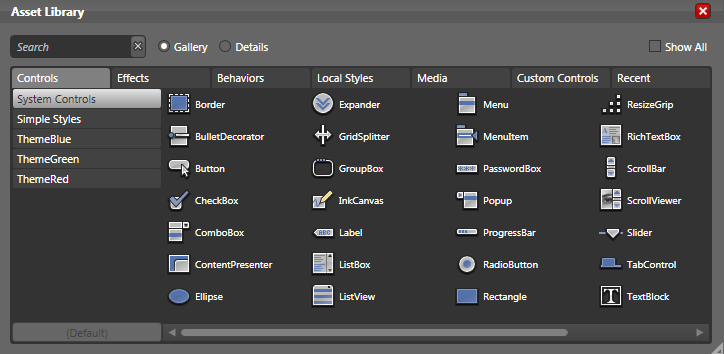
  • Supports for shaders : the assets panel now contains a “shader” category – drag’n’drop on the artboard and you’re done
  • Supports for projections in Silverlight3, new category from the property grid to edit them
  • Import from Photoshot and Illustrator functionality !
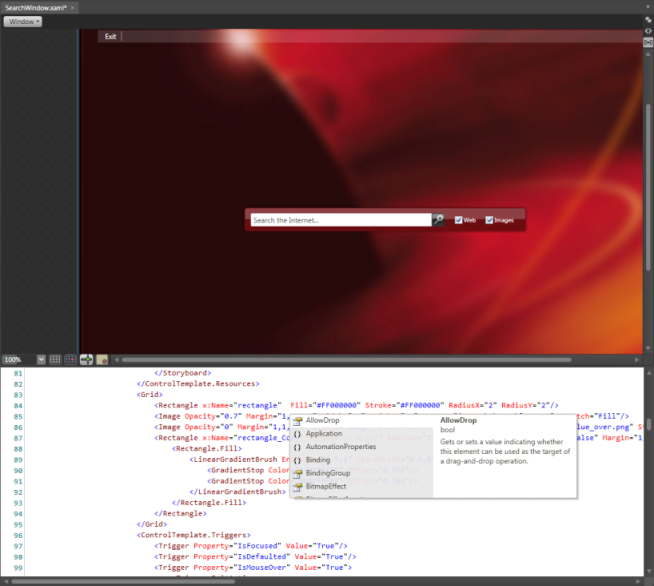
  • XAML Intellisense (oh my god !)
  • Team Foundation Server support
  • Sample data source generation inside Blend3 (Blend is able to generate sample data such as texts and images)
  • New features: behaviours that can be drag’n’dropped from the assets panel on the artboard to attach a piece of code to a visual element (could be used to start an animation for example)
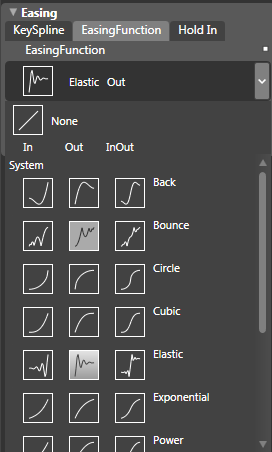
  • Easing functionality when working with animation: define elastic, cubic, exponential animations (I think designers are going to have some fun)
  • New extensibility points to the Editor: custom adorners, custom panels, extend property grid, etc.

Here are some screenshots I just took running the preview on my machine. I think Blend3 is going a major step forward in the Expression Studio 3. Don’t wait a second to play with it !

welcome

Welcome to Blend3 !

assets

The new assets panel

animations

Easing functionality

intellisense4

XAML Intellisense !

kick it on DotNetKicks.com