I’m still playing with MVVM at work and I got a new occasion to setup a dialog using the MVVM methodology.
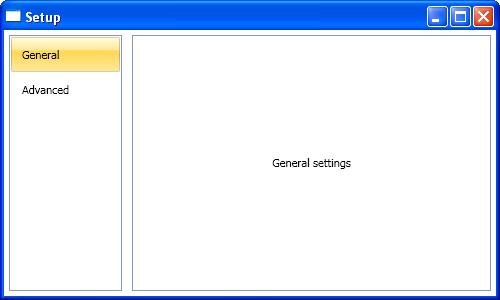
I really love the process of creating User Interface using MVVM, the process is so much natural ! Basically, I needed to create a “setup” dialog in the application I’m currently working on. I wanted to achieve something like this:
Of course, I wanted to create this dialog using the power of WPF. My primary objective when I create a new dialog is to keep the code-behind empty. Using MVVM it took me about 10 minutes to create the basic structure of the dialog withouth writting a single line of code in the xaml.cs files.
Here is the process I followed to create this dialog. This is the “thinking with MVVM” part because I’m explaining the reasoning I had 🙂 You can download the source code for this example here.
Setup the main dialog
When I need quick prototypes, I often don’t use Blend and type the XAML directly into Visual Studio editor. That was the very first part I did to write this XAML:
Pretty easy isn’t it. Please note the “Content goes here” comment. I knew I wanted to put the settings dialogs here, but I didn’t know how… I named this file ConfigurationDialog.xaml.
Create sub-configuration dialogs
For this example, I created 2 sub-configuration dialogs just for the demo. I just put a TextBlock into a Grid to demonstrate the principles. Of course, we should add real configuration controls such as CheckBox, TextBox, etc. Those 2 new files are GeneralSettingsView and AdvancedSettingsView and are UserControls.
Create a ViewModel class for each View
I used to use an abstract base class for all my ViewModel classes where I implement the INofityPropertyChanged interface. I also use a trick from Josh Smith to throw an exception if the property name doesn’t exist when the PropertyChanged event is raised.
That gives us 3 new files: ConfigurationDialogViewModel, GeneralSettingsViewModel and AdvancedSettingsViewModel. Because I wanted configuration dialogs to have a common Name property (to identify them in the UI), I created a base class SettingsViewModelBase.
Setup the ViewModel of the main View
I needed the main View to expose the other configuration views available. I used an ObservableCollection for that:
public class ConfigurationDialogViewModel : ViewModelBase
{
        private readonly ObservableCollection settings;

        public ObservableCollection Settings
        {
            get { return this.settings; }
        }

        public ConfigurationDialogViewModel()
        {
            this.settings = new ObservableCollection();

            this.settings.Add(new GeneralSettingsViewModel());
            this.settings.Add(new AdvancedSettingsViewModel());
        }
}
Setup the main View to consume datas from its ViewModel
I did some changes in the XAML to databind the ListBox’s ItemsSource property to the ViewModel. Because I always set the DataContext property of a view to its associated ViewModel, there is no ambiguity:
ItemsSource="{Binding Settings}".
The ListBox control has no idea how a SettingsViewModelBase object (that is in the associated ObservableCollection) should be displayed. We need a simple DataTemplate to specify this information:
And finish using my favourite part !
We just setup a ListBox to consume a collection of SettingsViewModelBase class to build a menu, fine. By using a very simple DataTemplate, we said: “I want to render the SettingsViewModelBase object in the ListBox using a TextBlock”.
We can take this reasoning one step further. We have a View associated to each SettingsViewModelBase. ListBox was fine to have a collection of controls. How could we display only one control ?
We can use a ContentControl of course ! Because we want do display the dialog that is currently selected in the menu, we can use a simple DataBinding (here, the ListBox has been named ListBoxMenu):
One more time, we got a rendering problem. The ContentControl doens’t know how to render a SettingsViewModelBase object. Well, it’s not a big deal, just specify it:
What I’m saying here is that GeneralSettingsViewModel should be rendered using a GeneralSettingsView. That’s exactly what we need ! Because the Views are created using a DataTemplate, we do not need to setup the DataContext, it will be automatically registered to the templated object, the ViewModel.
Conclusion
The example I describe here is very simple. The goal was to show the process of creating a dialog thinking in the “MVVM” way. It was very natural to use the concepts I explain here. The code-behinds are completely empty and ViewModel classes are testable ! Because the View are XAML only, I can give them to a designer that will tweak them to make them have a nice look.
You can download the source code for this example here.