Almost 1 year ago, I started a series of blog posts entitled “WPF Internals”. I though I’d have more time to write entries on this subject but I wrote only 2 subjects:
- WPF internals part 1 : what are the core WPF classes ?
- WPF internals part 2 : how the WPF controls are organized ?
Today, I’m ready to share with you part 3: how the Z-Index functionality works ? As for the other article of this series of blog post, the information I’m sharing here is based on my personal understanding of how stuff works. It might be wrong on some points !
The Z-Index is a property which can be set in order to control the order of appearance of your control:
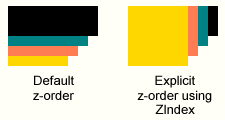
In WPF it’s the Panel type which defines an attached property called Zindex:
public static readonly DependencyProperty ZIndexProperty = DependencyProperty.RegisterAttached(
	"ZIndex",
	typeof(int),
	typeof(Panel),
	new FrameworkPropertyMetadata(0, new PropertyChangedCallback(Panel.OnZIndexPropertyChanged)));
which register a PropertyChangedCallback to be notified whenever its value changes. This method finally calls another method:
internal void InvalidateZState()
{
    if (!this.IsZStateDirty && (this._uiElementCollection != null))
    {
        base.InvalidateZOrder();
    }
    this.IsZStateDirty = true;
}
As you can see, the value of the IsZStateDirty property is set to true. We’ll soon see when this value is used. The InvalidateZOrder() is actually found in the Visual class. Here is a brief reminder of the core WPF types:
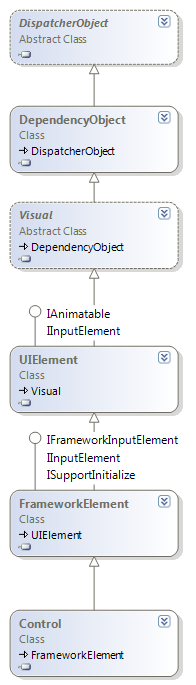
So, in the Visual type we have the InvalidateZOrder() method:
[FriendAccessAllowed]
internal void InvalidateZOrder()
{
    if (this.VisualChildrenCount != 0)
    {
        this.SetFlags(true, VisualFlags.NodeRequiresNewRealization);
        /* … */
    }
}
Which, as you can see, update the value of an enumeration (VisualFlags). Then the chain of method call stops here. The next interesting steps is when the GetVisualChild method (from the FrameworkElement type) gets called in the Panel type:
if (this.IsZStateDirty)
{
    this.RecomputeZState();
}
The RecomputeZState is a private method of the Panel class. The goal of this method is to update an array of int which is used as a lookup-table in order to convert the visual elements from their logical positions to their visual positions. At the end of this method, which is by the way highly-optimized with stuff like this
int z = _elements[i] != null
? (int)z = _elements[i].GetValue(ZIndexProperty)
: zIndexDefaultValue;

stableKeyValues.Add(((Int64)z << 32) + i);
lutRequired |= z < prevZ;
prevZ = z;

isDiverse |= (z != consonant);
the IZStateDirty value is set to false, and the zLut (z-order look up table, an int[]) is up-to-date. The the GetVisualChild method simply use the lookup table to convert logical position to visual position
int num = (this._zLut != null) ? this._zLut[index] : index;
return this._uiElementCollection[num];
Summary:
- The Z-Index functionality of WPF is implemented using an attached property
- This attached property is defined in the Panel type
- When the value of the attached property changes, a flag is set at the Visual level and at the Panel level
- When the GetVisualChild methods gets called on the Panel, the dirty status of the Z-Index is check
- If necessary, a lookup-table is computed to convert logical position (in the Children collection) from visual position
- Changing the ZIndex property of a child object does not change its position within the collection. The ordering within the collection remains the same