All posts by Jeremy

Mix10: Windows Phone 7 series development tools available

The first keynote of Mix10 is just over and the biggest announcement I was waiting for occured: Windows Phone 7 series development tools are NOW available for FREE.

Grab the tools right now ! You’ll need:

If you want more details about Blend4, you can check out Christian Schormann’s overview. A new website is now live for all Windows Phone 7 series related development information at http://developer.windowsphone.com/

Another announcements is the availability of Silverlight 4 RC and support for VS2010 RC:

For more information about Silverlight 4 RC, you can check out the blog post of Tim Heuer.

I can’t wait to play with all this new stuff. It’s very impressive to see the work done around Windows Phone 7 series. WPF and Silverlight developers just became Windows Phone developer today, and I think this is great !

I’ll give more feedback as soon as the tools will be installed 🙂
Mix10 starting today !

Mix10 is starting today and we can expect many cool announcements during the keynote. You can watch the keynote online at live.visitmix.com. I’ll try to give feedback as soon as possible. Because I’m not lucky enough to be in Vegas, I’ll watch the keynote tonight (French time !) at home with some coworkers.

Last information before the keynote, it looks like we’ll have some announcements about Silverlight running on Symbian devices…

Changing the layout of a WPF TreeView to look like multiple ListBox

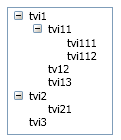
Last week at work I was requested to create a new control which should have the behavior of the WPF treeview with a template involving multiple ListBox. To understand what I mean, I wanted to change the layout of this:

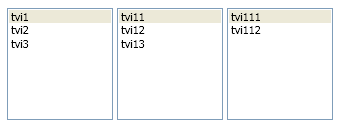
To this:

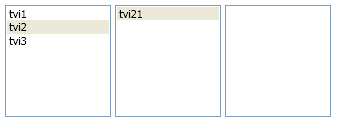
Of course, selection must work properly:

I asked a question on StackOverflow about this control because I didn’t find any easy way to do it. I though at the beginning that playing with the templates of the TreeView and TreeViewItem would do the trick but it didn’t.

The solution I finally choose involves creating multiple ListBox and wire them together using DataBinding:

  • I create a new CustomControl which inherits Control (I couldn’t use neither Selector or TreeView because I wouldn’t have been able to manage the SelectedItem property from the derived class)
  • In the template of this CustomControl is an ItemsControl. This ItemsControl has its ItemTemplate property set to a DataTemplate containing a ListBox.
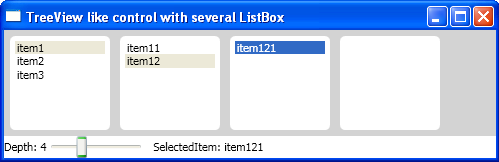
  • The CustomControl has a Depth property of type int. This property indicates the number of ListBox that should be generated.
  • The CustomControl automatically databound ListBoxes together: each ListBox’s ItemsSource property is databound to the SelectedItem’s children property of the previous ListBox in the visual tree.
  • The CustomControl has a SelectedItem property and a SelectionChanged event (like Selector-derived class).
  • I added an IsReallySelected attached property to the ListBoxItem which are generated. This enables to databing an IsSelected property of the ViewModel class behind the control with the IsSelected of the ListBoxItem. I had to create an attached property because its value is true when the ListBoxItem is selected AND the parent ListBox has IsSelectionActive set to true.

Here is the result:

You can download the source code of this sample (VS2010 RC solution).